 e060668cb2
- alert button url was not honouring the enableModeration query string
- slot index was not appear for slot index 0
ethcc-demo
This demo app shows past and real-time Codex storage request events on the Codex testnet.
Running the demo
First, clone this repo
git clone https://github.com/codex-storage/ethcc-demo && cd ethcc-demo
Then, create a private key to run codex
Create an Ethereum public/private key pair using a web wallet or consider other local methods:
Use Docker
# Generate keypair
docker run --rm gochain/web3 account create
Use Python code
-
Create a venv
pip3 install virtualenv venv=codex-eth-key mkdir $venv && cd $venv python3 -m venv env source env/bin/activate -
Install required packages
pip3 install web3 -
Create a script
vi eth-keys.pyfrom eth_account import Account def generate_ethereum_keypair(): # Generate a new Ethereum account account = Account.create() # Get the private key private_key = account._private_key.hex() # Get the public key (Ethereum address) public_key = account.address return private_key, public_key # Generate the Ethereum key pair private_key, public_key = generate_ethereum_keypair() # Print the keys print("Private Key:", private_key) print("Public Key (Ethereum Address):", public_key) -
Generate the keys
python3 eth-keys.py -
Cleanup
deactivate
cd .. && rm -rf $venv
# Example
Private key: 0xacec4df7549199708a9f66b151aea7bf41b4d30bd325b96b26f017246226e1a3
Public address: 0x1C408C8572ce7d5E79a3a6D353e5FC2E8E2c49ce
Mint testnet tokens
Before you can use the marketplace functionality of Codex, you will need to obtain some tokens in the testnet.
- Join the Codex Discord server
- Go to the
#botchannel. - Give your public key to the bot using
setcommand.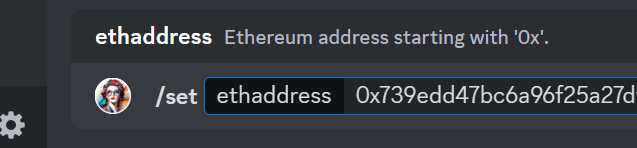
- Ask it politely to mint some tokens for you using
mintcommand.
Copy private key to the setup directory
Before we run a codex instance, we need to ensure our private key is saved on
disk for the Codex instance to use. Copy your private key to
path/to/demo/codex-setup/eth.key:
# copy your private key to eth.key
echo 0xacec4df7549199708a9f66b151aea7bf41b4d30bd325b96b26f017246226e1a3 >> ./codex-setup/eth.key
chmod 0600 ./codex-setup/eth.key
Build codex and setup your environment
We need to build a Codex instance from source before running it. In a separate terminal, run:
cd .. && git clone https://github.com/codex-storage/nim-codex && cd nim-codex
export CODEX_PATH=$(pwd)
make -j12 update && make -j12
Note: the parameter -j12 specifies the number of logical cores your CPU has,
change to match your CPU. If unknown, use -j2.
Run codex
In a new terminal, run codex:
chmod +x codex.sh
./codex.sh
Finally, run the demo app
Back in the original terminal, run the demo app:
yarn
yarn dev
Recommended IDE Setup
VSCode + Volar (and disable Vetur).
Customize configuration
See Vite Configuration Reference.
Project Setup
yarn
Compile and Hot-Reload for Development
yarn dev
Compile and Minify for Production
yarn build
Lint with ESLint
yarn lint