mirror of
https://github.com/logos-blockchain/logos-blockchain-block-explorer-template.git
synced 2026-07-03 13:50:12 +00:00
 e55f7345fc
Batches updates to sqlite db in chunks of 10k. Well within SQlite query
limits (32,766) as of v3.32.0 which is bundled with python 3.9+.

Adds cleanup code to terminate httpx client connection in node_api.

style: fmt files

style: fmt file
Nomos Block Explorer
This is a Proof of Concept (PoC) for a block explorer for the Nomos blockchain.
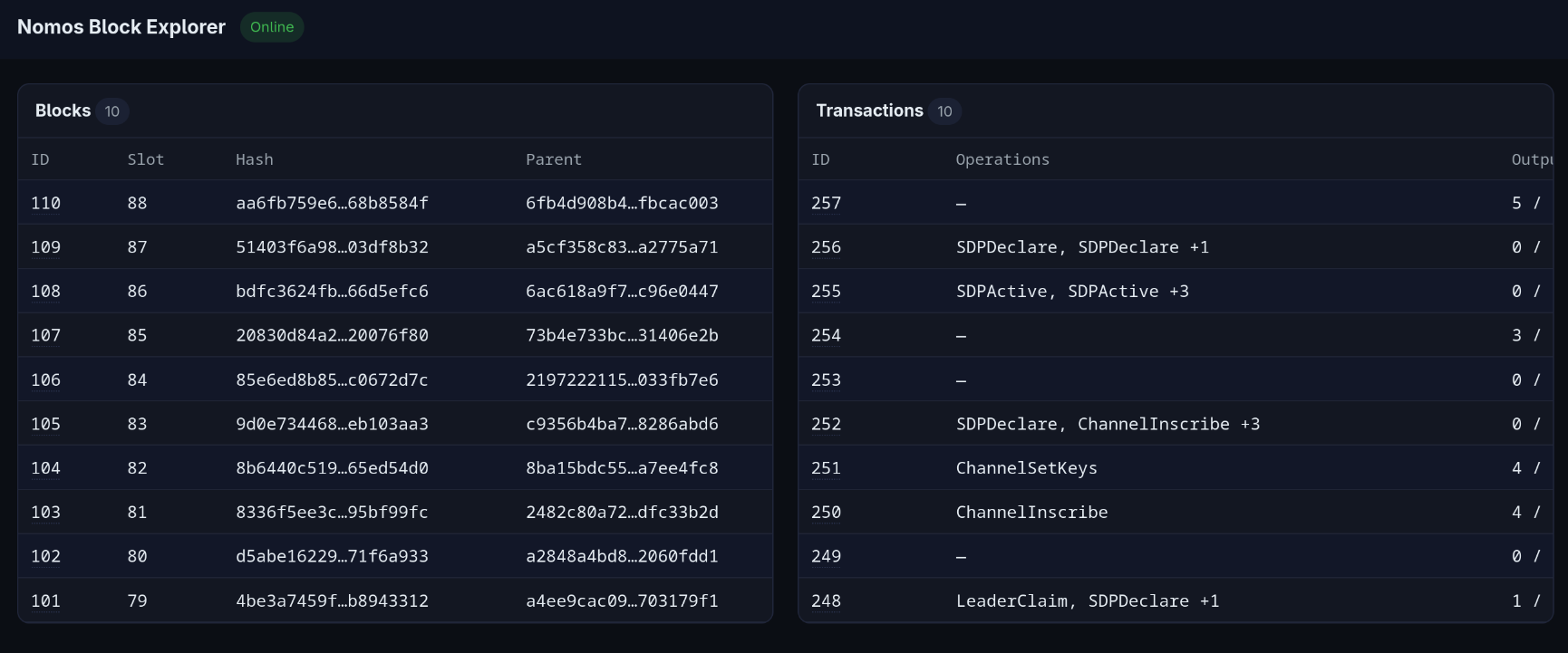
Features
- Frontend (React-like SPA)
- Client-side routing with Home, Block, and Transaction pages.
- Home: Live stream of the latest Blocks and Transactions.
- Block: Details of a Block, including a list of its transactions.
- Transaction: Details of a Transaction.
- Client-side routing with Home, Block, and Transaction pages.
- Backend (FastAPI)
- API
- REST API to query Blocks and Transactions.
- SSE API to stream live Blocks (and its transactions).
- Node Management
- Pluggable API (e.g.
fake,http) to query nodes. - Pluggable Manager (e.g.
noop,docker) to manage local nodes.
- Pluggable API (e.g.
- Simple backfilling mechanism to populate historical blocks.
- API
Architecture
The Nomos Block Explorer follows a three-tier architecture with a clear separation of concerns:
High-Level Overview
graph LR;
A[Nomos<br/>Node] -->|REST/SSE| B["Backend<br/>(FastAPI)"]
B -->|REST/SSE| C["Frontend<br/>(Preact)"]
B <--> D["Database<br/>(SQLite)"]
Components
1. Frontend (/static)
- Framework: Preact (lightweight React alternative)
- Routing: Client-side SPA routing
- Architecture: Component-based with functional components
- Communication: REST API calls and Server-Sent Events (SSE) for real-time updates
2. Backend (/src)
- Framework: FastAPI (Python async web framework)
- API Layer (
/src/api): Serializers, REST and streaming endpoints - Core (
/src/core): Application setup, configuration, base types and mixins - Database Layer (
/src/db): Repository pattern for data access - Models (
/src/models): Domain models (Block, Transaction, Header, etc.) - Node Integration (
/src/node):- API: Pluggable adapters to communicate with Nomos nodes (
fake,http) and serializers - Manager: Pluggable node lifecycle management (
noop,docker)
- API: Pluggable adapters to communicate with Nomos nodes (
3. Data Flow
- Node Updates: On startup, the backend starts listening for new blocks from the node and stores them in the database
- Backfilling: After at least one block is in the database, the backend fetches historical blocks from the node and stores them
- Client Updates: Frontend subscribes to SSE endpoints for real-time block and transaction updates
- Data Access: All queries route through repository classes for consistent data access
4. Key Design Patterns
- Repository Pattern: Abstraction layer for database operations (
BlockRepository,TransactionRepository) - Strategy Pattern: Pluggable Node API implementations (fake for testing, HTTP for production)
- Adapter Pattern: Serializers convert between Node API formats and internal domain models
- Observer Pattern: SSE streams for pushing real-time updates to clients
Requirements
- Python 3.14
- UV Package Manager
Optional
- Docker: To run a local node.
How to run
-
Install the dependencies:
uv sync -
Run the block explorer:
PYTHONPATH=src uv run python -m main
By default, this will try to connect to a local Node running on port 18080.
-
You can optionally run it via Docker with:
docker build -t nomos-block-explorer . && docker run -p 8000:8000 nomos-block-explorer -
If you want to run the Explorer without a Node, make sure to set the
NBE_NODE_APIenvironment variable tofake:-
PYTHONPATH=src NBE_NODE_API=fake uv run python -m main -
docker run -e NBE_NODE_API=fake -p 8000:8000 nomos-block-explorer
-
Configuration
The block explorer is configured through environment variables. The following variables are available:
NBE_LOG_LEVEL=DEBUG  # DEBUG, INFO, WARNING, ERROR, CRITICAL

NBE_DEBUG=true  # Randomizes transactions in BlockSerializer

NBE_NODE_MANAGER=noop  # noop, docker
NBE_NODE_COMPOSE_FILEPATH=/path/to/docker-compose.yml  # Only used if NODE_MANAGER=docker

NBE_NODE_API=http  # fake, http
NBE_NODE_API_HOST=localhost  # Only used if NODE_API=http
NBE_NODE_API_PORT=18080  # Only used if NODE_API=http
NBE_NODE_API_TIMEOUT=60  # Only used if NODE_API=http
NBE_NODE_API_PROTOCOL=http  # Only used if NODE_API=http

NBE_HOST=0.0.0.0  # Block Explorer's listening host
NBE_PORT=8000  # Block Explorer's listening port
If running the Block Explorer with Docker, these can be overridden.
Considerations
This PoC makes simplifications to focus on the core features:
- Each slot has exactly one block.
- When backfilling, the block explorer will only backfill from the earliest block's slot to genesis.
Ideas and improvements
- Fix aforementioned assumptions
- Backfilling
- Make requests concurrently
- Backfill all slots
- Upsert received blocks and transactions
- Database
- Update to Postgres
- Add migrations management
- Add relevant indexes to columns
- Add interfaces to database repositories:
BlockRepositoryandTransactionRepository - Add tests
- Colour logs by level
- Reconnections
- Failures to connect to Node
- Timeouts
- Stream closed
- Frontend
- Add a block / transaction search barImprove
- Make pages work with block/transaction hash, rather than the
id
- Error handling
- Exceptions raised within async code pop up as ugly stack traces
- Better error messages
- Remove DB IDs from API responses and use hashes instead